I built a free project estimator.
Not a SaaS trial.
Not a signup wall.
Not one of those tools that lets you fill in half an estimate and then asks you to create an account.
A working browser app.
You can use it here: Free Project Estimator.
It supports six estimation methods on the same project — PERT three-point, weighted, three-point average, parametric, analogous, and fixed. It captures roles and rates, phases and tasks, expenses, a risk register, contingency, milestones and a Gantt-style timeline. It runs a script-driven rule engine over the estimate and flags the things spreadsheets quietly forget. It produces a printable A4 PDF you can hand a client.
No signup. No cloud account. Your pricing data stays in your browser.
That is the point.
Why I Built It
Most estimates are wrong because of what is missing, not because of what is in them.
The hours per task are usually fine. The line items are usually fine. The rate is usually fine.
What is missing is the project management, the quality assurance, the deployment, the discovery and planning, the documentation, the client revisions, the warranty and support. What is missing is contingency. What is missing is the risk register. What is missing is exclusions on the fixed-price scope, or assumptions on the tender response.
Those gaps eat margin one project at a time.
A spreadsheet does not flag any of them. A SaaS trial wants you to sign up before you can find out. A US-priced calculator does one method on one currency. A Google Sheet someone parked on a personal site does not survive an estimate review.
So I built something that does the boring structural work in fifteen minutes, in a browser, for free, without sending your pricing to anyone's server.
What the Free Project Estimator Does
It handles:
- Six profiles to start from — Software, Website, Consulting, Tender, Freelancer, Custom. Each profile loads sensible default tasks, milestones and warning rules.
- Six estimation methods on the same project, mixed and matched per task:
- PERT three-point: (O + 4M + P) / 6, with standard deviation = (P − O) / 6 and variance computed.
- Three-point average: (O + M + P) / 3.
- Weighted: custom O / M / P weights, defaults 1:4:1.
- Parametric: quantity × hours per unit. Number of pages × hours per page; number of API endpoints × hours per endpoint.
- Analogous: reference project hours × similarity % × complexity multiplier.
- Fixed: flat amount, no hours.
- Roles and rates, hourly rate, working hours per day.
- Phases, tasks, expenses, milestones.
- Risk register with probability × impact in cost and hours, fed into the project total.
- Contingency %, management reserve %, markup %, VAT, currency.
- A simple Gantt-style timeline view.
- Cost composition, phase, role and milestone charts, auto-generated.
- A printable A4 estimate report — cover, summary, assumptions, exclusions, totals, line items, expenses, risks, timeline, milestone schedule, signature blocks.
- JSON export and import, per project or full backup, schema-versioned for future migrations.
That last one matters. The schema is versioned, so a backup you take this year still imports next year.
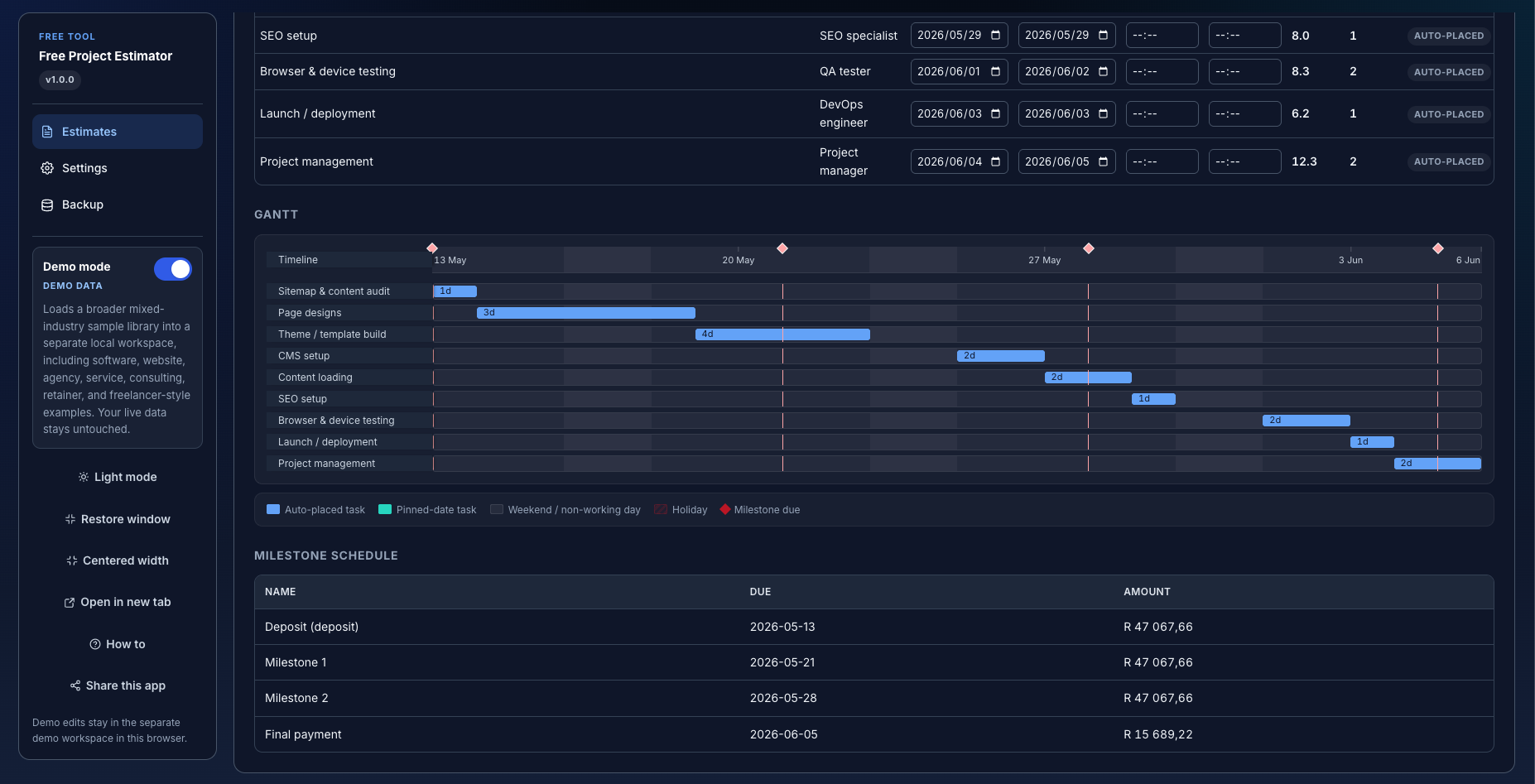
The screenshot above shows the demo workspace: SEO setup, browser & device testing, launch / deployment and project management auto-placed across the timeline, with diamonds marking milestone due dates, and a milestone schedule resolving to a deposit, two interim payments and a final payment. Demo edits stay in the demo workspace; your live data is untouched.
The Rule Engine — The Reason This Exists
The estimator is script-driven. Formulas. JSON rule lists. No AI. No API calls.
The rule engine is the part most spreadsheets do not have. It looks at your estimate and flags:
- Missing project management.
- Missing QA on software work.
- No deployment allowance.
- No discovery / planning.
- No documentation.
- No client revisions budget.
- No contingency.
- No risk register.
- No warranty / support.
- Browser / device testing missing on a website project.
- Security review missing on a software project.
- Milestones not summing to 100%.
- Timeline too short for the work.
- High complexity with low contingency.
- Pessimistic estimate too tight (the spread is unrealistic).
- Fixed-price scope without exclusions.
- Tender estimate without assumptions.
You will recognise most of those from a project that lost money. They are the line items that quietly disappear under deadline pressure, and the ones a more senior reviewer always asks about.
How to Use It (in 7 steps)
- Open the project estimator. Open the tool in any modern browser. No account, no signup. Your estimates stay on your device.
- Pick an estimate profile. Choose Software, Website, Consulting, Tender, Freelancer or Custom. Each profile loads sensible default tasks, milestones and warning rules.
- Capture project info. Project name, client, currency, hourly rate, working hours per day, complexity, contingency, markup and VAT.
- Estimate the work. Use the work breakdown table to add phases and tasks. Choose a method per task: PERT, weighted, parametric, fixed, or analogous.
- Add expenses, risks and milestones. Capture hosting, licences, subcontractors. Capture risks with probability and impact. Split payment into milestones.
- Review warnings, charts and timeline. The rule engine flags missing items (PM, QA, deployment, contingency, milestones not summing to 100%, timeline too short). Charts and a Gantt view are auto-generated.
- Print the report. Use the Report tab to print a professional A4 PDF estimate with cover, summary, line items, expenses, risks, timeline and signature blocks. Use your browser's "Save as PDF" in the print dialog.
Fifteen minutes for a small project. Longer for a multi-month software platform — but the structure is the same.
What It Does Not Do
It does not file or sign anything. It is not a contract.
It is not legal, tax, accounting or quantity-surveying advice. Scope, assumptions, exclusions and any contractual terms remain your responsibility.
It is not a multi-user platform. There is no permissions model, no audit trail, no team workspace.
It is not an estimate-to-billing pipeline. The estimate stops at the PDF. Turning that into invoices, milestone billing, change orders and a paid-up debtors book is a different system.
It does not run any AI. Formulas and JSON rule lists, no API calls. That is deliberate. The numbers should be reproducible.
Where Your Data Is Stored
Rates, margins, client names and risk notes are commercial. The tool stores everything in your browser using IndexedDB and localStorage. Nothing about your estimates is uploaded to a server.
That is useful, especially if you are quoting against a competitor and would rather not type your pricing into someone else's web form. It also has a tradeoff: if you clear browser data, switch devices, or use private browsing, your saved estimates can be lost.
That is why the Backup tab matters.
Export a JSON backup after any meaningful estimate. Especially before changing devices or clearing browser data. The same backup file imports back into the tool on another device. The schema is versioned, so backups stay portable across future updates.
Local control is useful. It also means backups are your responsibility.
I would rather flag that than hide it in fine print.
Who This Is Built For
- Solo freelancers — developers, designers, copywriters, consultants — quoting one project at a time.
- Small consulting practices producing structured estimates for engagements.
- Small agencies writing proposals that have to survive a finance review.
- SMME contractors bidding on tenders, who need assumptions and exclusions captured properly.
- Software project managers in larger organisations who want a fast, structured second-opinion estimate before approving a team's number.
- Founders quoting their first paying client, who do not yet have an estimating template.
- Quantity surveyors and bookkeepers helping small operators put a defensible price on work.
If a single-cell spreadsheet is your current estimating tool, this is built for you.
When the Free Tool Is Enough
When you are quoting a single project at a time, your team is small, and you keep regular JSON backups, the free tool is enough.
You get a structured estimate. The estimation methods are explicit. The rule engine flags the line items spreadsheets quietly forget. The PDF is professional. The data does not leave your device.
When the Free Tool Is Not Enough
When you grow past solo or small-team estimating — when you need multi-user access, when you need an audit trail of who changed which estimate when, when estimates have to flow into invoices and milestone billing, when you need integrations with your CRM or accounting, when version history and approvals start to matter — that is when you have outgrown a browser tool.
That is when a custom platform application makes sense. An estimating module that talks to your billing, your CRM, your accounting and your project tracking, built around the workflows you already run.
That is the work I do for businesses that have outgrown a browser-only tool. See Custom platform applications or talk to me directly.
For a broader business operations platform — billing, bookings, CRM, inventory, accounting and connected workflows — see BX1X.
Use It
The tool is here:
It is free. It is not a trial. It will stay free.
If it helps you, share it with one freelancer or PM who is still quoting from a single cell in a spreadsheet.
If you have outgrown it, get in touch.
Built in Cape Town by Anton de Villiers — the developer behind BX1X.