
Services / Single Page Apps
An app on your website that does one job, without reloading the page.
A calculator, selector, booking or quote tool that sits on a page of your existing site, talks to your systems, and answers the moment someone clicks.
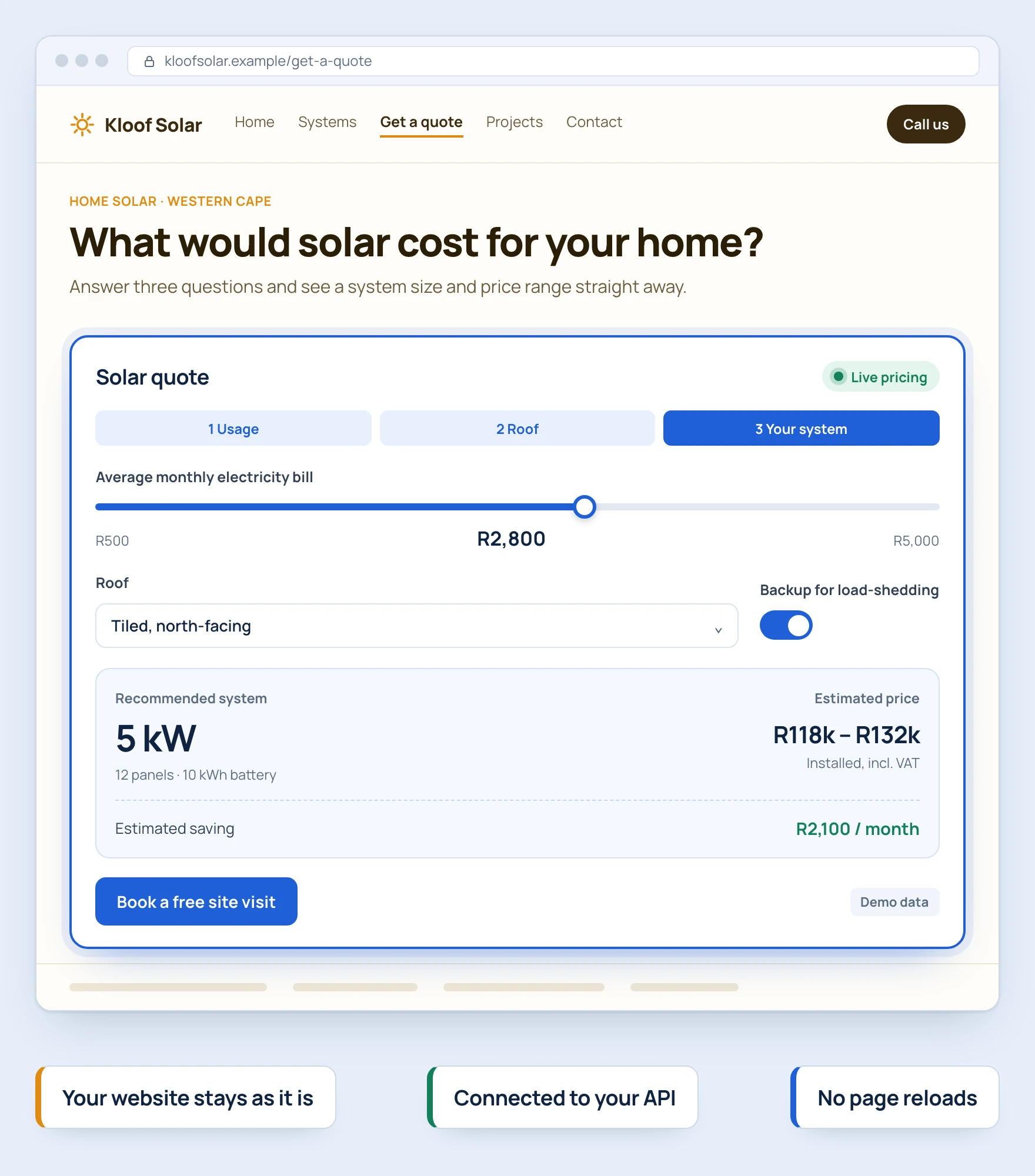
Does this sound like you?
This is usually where the conversation starts.
- “Customers ask us for a price or a booking, and we work it out by hand every time.”
- “I want people to try something quick on our website, not fill in a long form.”
- “Our website already does almost everything. We just need this one extra screen.”
- “We don’t want a whole new system. We want this one job done properly.”
- “We built a calculator in a spreadsheet years ago, and now half the office depends on it.”
- “Everyone has their own copy of the same spreadsheet, and they never quite match.”
What I’d do.
Find the one job worth building.
Tell me the price, booking, lookup or calculation your customers or team keep asking for. We pick one job to turn into an app, not a whole system.
Build it around one real example.
You get a working tool tested against a real case from your business, so you can see exactly what it produces before we go further.
Hand it over, wherever it needs to live.
The finished tool works on its own, or sits inside your WordPress, Shopify or WooCommerce site. Ownership is agreed in writing, and I stay reachable after.
Proof.
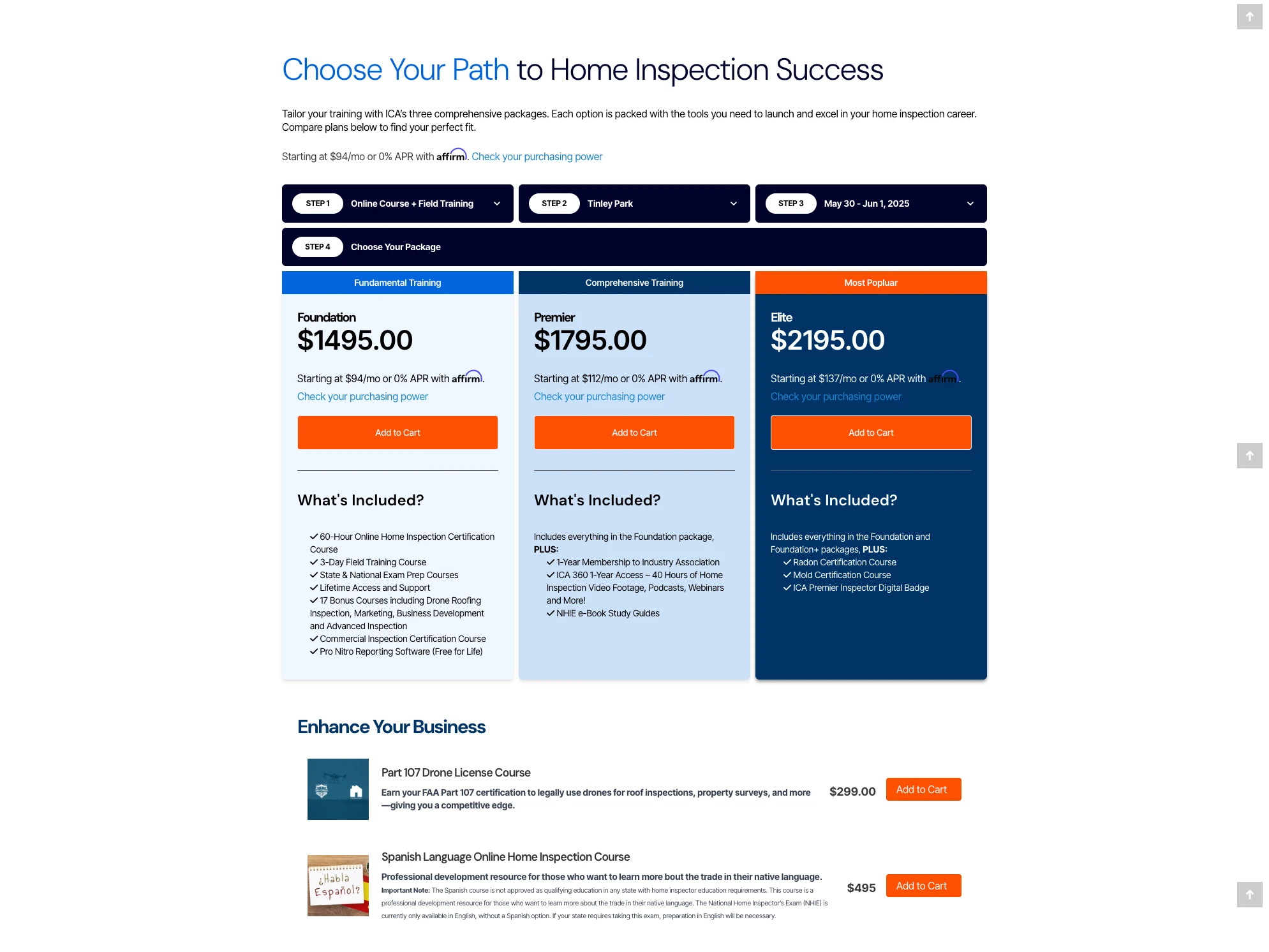
One screen walks the buyer through the choice, so nobody has to phone and ask which package fits.
The tool asks for a location, a training type and dates, then shows the right options. No off-the-shelf plugin matched their exact steps.
See the ICA project →Another calculator, on another platform.
The Optivest MedXpert price calculator sits inside a WordPress page. It reads live pricing from a secured system, so a visitor gets a real answer without a phone call.
- Live pricingReads current pricing from a secured system instead of a fixed table.
- Loads your detailsFills in a visitor’s own information automatically when they arrive through a secure link.
“He was professional, timely, courteous and above all, he went out of his way to ensure my task was completed no matter what.”
CherylClub Hub, London, Ontario
How it starts, and what it costs.
You’re never committed to more than one piece.
- A free conversation.Tell me the workflow you want fixed, who uses it, and one real example of the job.
- The written plan.The workflow, who uses it, what finished looks like, and a fixed quote for the tool. Fixed fee, agreed in writing before it starts, and credited against the first piece. The plan is yours to keep.
- One working piece, at a fixed price.What I quote is what you pay for the agreed scope. Every piece after it is quoted before it starts, and you can stop after any piece and keep what’s built.
If the job is already clear, I quote it straight away.
The written plan is for the parts that are still uncertain. If it isn’t a fit, I’ll say so on the call.
Not sure where to start? Answer seven short questions →For your technical person
What this covers
A single page app loads once, then updates what’s on screen as the visitor clicks, fetching data from an API in the background instead of reloading the page. That is why it feels quick, like an app rather than a website, and keeps the visitor on the page while they get their answer. Three shapes of single page app: browser-only when data should stay on the device, API-connected when the workflow needs live data or write-back, and platform-embedded inside WordPress, WooCommerce, Shopify or a CRM when the business already runs one of those. 9 years building single page apps since 2017, with eight shipped public tools as proof.
What I build
- Form-rich workflow apps: multi-section forms with live preview, browser-local persistence, PDF export and JSON backup. Examples: the Free South African Billing App, the Free Payslip Generator.
- Compute-heavy calculators: PERT three-point, weighted, parametric, analogous and fixed estimation methods, a risk register with probability and impact, and amortisation tables. Examples: the Free Project Estimator, the Compound Interest Calculator, the Payment Gateway Fee Comparator.
- Visual editors with drag-and-drop: section, column and block trees with sortable behaviour, undo and redo, inline property panels, and a custom block-tree-to-output compiler. Example: the Email Signature & Template Generator, built with @dnd-kit.
- Lightweight utilities: single-purpose tools that do one thing on one screen, such as the PayPal.Me Link Generator with its QR code and WhatsApp or email share.
- Single page apps for WordPress: calculators, configurators, estimators, intake forms and admin screens, delivered as a small plugin, static page bundle, shortcode app or custom admin view. Built with React plus the WordPress REST API or a custom PHP API.
- Single page apps for WooCommerce: product selectors, configurators and pricing tools that help a shopper before they reach cart, plus focused admin or operations screens. Read-only for simple selectors, API-connected when the workflow needs orders, pricing logic or ERP sync.
- Single page apps for Shopify: calculators, comparison tools, ROI tools and configurators delivered as a Shopify page section, theme block, static page or embedded React app, connected to Shopify’s APIs or a custom Node API when needed.
A local landing page for this service also exists: Single Page App Developer Cape Town.
Client single page apps already shipped
- Optivest Price Calculator SPA: WordPress, React, secured API data. See the project.
- Optivest MedXpert SPA: medical aid plan selection embedded in WordPress, React, REST API. See the project.
- Storewell Parking Booking Dashboard: WordPress admin React app with a custom REST API, calendar and role-aware screens. See the project.
- ICA Custom Course/Product Selector: public and admin React apps inside WordPress, custom MySQL tables and REST API. See the project.
- Truly Essential Shopify Credit System: embedded React app in Shopify pages, Node API, ERP write-back. See the project.
- Proficient Auto VIN Lookup App: JavaScript app inside a WordPress plugin, external VIN API. See the project.
- School Lookup App: React search app inside WordPress, using the Google Custom Search JSON API. See the project.
- Find-a-Surgeon-in-Your-Area App: React search app with PHP APIs, SQL, geolocation and map APIs. See the project.
Free tools, shipped and public
- Free South African Billing App: invoices, quotes and credit notes, logo upload, reusable client and item libraries, browser print to PDF, JSON backup. Open it.
- Free South African Payslip Generator: BCEA Section 33 payslip information with statutory UIF calculation against the SARS monthly UIFable-income ceiling. Open it.
- Free Project Estimator: PERT three-point, weighted, parametric, analogous and fixed methods, risk register, working calendar, gantt timeline, printable A4 estimate. Open it.
- Free Profit Margin Calculator: margin, markup and pricing analysis with VAT, sales tax, landed cost and scenario compare. Open it.
- Email Signature & Template Generator: sixteen signature layouts, ten branded email templates and ten disclaimer templates including a POPIA notice, plus a drag-and-drop Designer for custom layouts. Open it.
- Payment Gateway Fee Comparator: Yoco, iKhokha, Payfast, Peach, Ozow, Paystack, Zapper, SnapScan and Shopify, side by side, from published inputs. Open it.
- Compound Interest Calculator: loan repayment breakdown with service fees, finance costs, monthly amortisation tables and an interactive graph. Open it.
- PayPal.Me Link Generator: payment link builder with QR code generation and WhatsApp or email share. Open it.
Why this works
- The data model matches the job. Browser-only apps keep data in IndexedDB or localStorage. API-connected apps use a server or third-party system as the reliable record. Embedded apps follow the host platform’s own rules.
- The platform stays in place. A focused app can sit inside WordPress, WooCommerce, Shopify, a CRM or a static tools path. The business gets the missing workflow without replacing what already works.
- The page around it carries the SEO. Search engines read what the app shows less reliably than ordinary page text, so the page it sits on keeps its own headings and copy, and the app does the work.
- Honest scope. A single page app does one workflow well. It is not a multi-user platform, and the page says so up front. When you outgrow the shape, the next step is Custom Platform Applications.
Tech stack
React, Next.js, TypeScript, IndexedDB, localStorage, @dnd-kit, WordPress REST API, WooCommerce APIs, Shopify APIs, WordPress shortcode delivery, Shopify theme or page section delivery, PostgreSQL when a thin API is needed, Node.js when a thin API is needed, static hosting, browser print to PDF.
How the engagement runs
Not a generic build process. A written scope and private quote, agreed before anything starts.
- Fit check first. We confirm the workflow, input, output and data lane. If access, integration or acceptance risk is still unclear, the next step is the written plan: a paid discovery at a fixed fee.
- Written scope and private quote. The proposal records the included outcome, the test that proves it works, dependencies, delivery window, payment terms and the change process before implementation starts.
- Build the agreed first version. Static deployment for browser-only tools, or platform deployment notes for connected work. Source handed over with a written manual, your hosting, your team, and ownership agreed in writing.
Most single page app projects fall into one of three buckets: embedding a useful public tool inside an existing site, productising an internal spreadsheet the team uses weekly, or building an API-connected or embedded workflow for WordPress, WooCommerce, Shopify, a CRM, an ERP or a custom API. You do not need a generalist selling a six-month build. You need someone who has shipped eight of these in public, can scope and quote in writing, and will hand over source code with ownership agreed in writing.
Technical FAQs
- Why not use a marketplace plugin instead of a custom app? Marketplace plugins handle the common cases. The part that does not match your buyer’s decision tree is where the marketplace fails. A custom single page app models your specific decision tree exactly and looks like your brand, with no per-seat subscription and no vendor lock-in.
- Can a single page app connect to an external API? Yes. That is one of the three shapes. The app holds the interface; the API holds the data. REST and GraphQL are most common. Shipped examples include the school lookup app (Google Custom Search JSON API) and the VIN lookup app (external API inside a WordPress plugin).
- Can a single page app write data to WordPress, Shopify or a CRM? Yes. The Optivest MedXpert and ICA selector both write through WordPress REST. The Truly Essential Shopify credit system writes through a Node API into the client’s ERP. The Storewell parking dashboard writes through a custom WordPress REST API.
- What can a single page app not do? It is not the right label for a full multi-user operating platform, tenant-wide deployment, per-seat billing product, or real-time collaborative system. Those move into Custom Platform Applications. It can still connect to an API when a focused workflow needs shared data or write-back.
- Can a single page app be a public SEO lead magnet? A useful public tool can attract its own search demand and demonstrate the format, but consulting demand must be measured separately. The tools at /tools are public examples, not evidence that every tool creates qualified enquiries.
Specialist terms and job titles
Also described as: single page app development, single page app for business, browser-based business tool, no-backend web tool, client-side business app, custom JavaScript browser app, single page application South Africa, POPIA-friendly business tool. Related platform terms: WordPress single page app, WooCommerce calculator embed, Shopify configurator, Shopify ROI calculator, WordPress shortcode calculator.
More background
Questions owners ask.
What exactly are you building me?
A small tool that does one job well, right there in a browser. It might stand on its own or live inside your existing website.
How long have you been building these?
9 years, since 2017. You can try eight of my own free tools right now, no signup needed, at /tools.
How is this different from a full custom system?
This is one tool for one job. A full system with logins, a database and screens for a whole team is a bigger project. That’s Custom Platform Applications, a separate service.
Where does our information end up?
It depends on the tool. Some keep everything on your own device and never send it anywhere. Others read and write to your website or another system, when the job needs that.
Can it sit on our existing WordPress, Shopify or website?
Yes. It can live right on the site you already have, instead of a separate one you have to maintain.
How much does it cost?
Every project is quoted privately once I understand the job. If parts of it are still unclear, the next step is the written plan, at a fixed fee. You’ll know the price of each piece before it starts. See how a project with me works →
Is this safe for customer information?
Tools that keep data on the device are the simplest option for privacy. When a tool needs to read or write to a live system, we agree exactly how that information is handled before anything is built.
Can it start small and grow later?
Yes. Start with the simplest version that does the job. Logins, live data or a bigger system can be added later if you need them.
Why not just use an off-the-shelf plugin?
Plugins cover most common needs well. When your business works differently from the usual case, a small tool built around exactly how you work fits better than forcing your process into someone else’s plugin.
Related help.
Tell me the one job your website can’t do yet. I’ll tell you honestly whether it needs an app.
+27 87 150 9305Monday to Friday, 09:00 to 20:00 SAST. Or email info@antondevilliers.com.